Quantcast
Post Pic

Check all uncheck all and invert checkboxes using jquery

To check all and uncheck all checkboxes using jquery is real fun. I tried making for my current project and shared with you for simple copy and paste elements.

.

Check DEMO before going on.

Step 1: Html setup

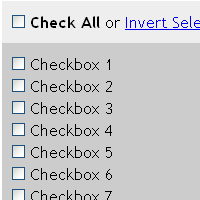
Let us assume that you have following checkboxes and controls.

1
2
3
4
5
6
7
8
9
10
11
12
13
14
15
16
<div class="controls">
	<span><input type="checkbox" class="checkAll" /> <b>Check All</b> <span> or 
	<span><a href="javascript:void(0);" class="invertSelection">Invert Selection</a></span>
</div>
<div class="elements">
	<span><input type="checkbox" class="cb-element" /> Checkbox 1</span>
	<span><input type="checkbox" class="cb-element" /> Checkbox 2</span>
	<span><input type="checkbox" class="cb-element" /> Checkbox 3</span>
	<span><input type="checkbox" class="cb-element" /> Checkbox 4</span>
	<span><input type="checkbox" class="cb-element" /> Checkbox 5</span>
	<span><input type="checkbox" class="cb-element" /> Checkbox 6</span>
	<span><input type="checkbox" class="cb-element" /> Checkbox 7</span>
	<span><input type="checkbox" class="cb-element" /> Checkbox 8</span>
	<span><input type="checkbox" class="cb-element" /> Checkbox 9</span>
	<span><input type="checkbox" class="cb-element" /> Checkbox 10</span>
</div>

.

Step 2: Jquery

Copy following code inside head tag of your html. (jquery included)

?View Code JAVASCRIPT
1
2
3
4
5
6
7
8
9
10
11
12
13
14
15
16
17
18
19
<script type="text/javascript" src="http://code.jquery.com/jquery-latest.pack.js" language="javascript"></script>
	<script type="text/javascript" language="javascript">
		$( function() {
			$( '.checkAll' ).live( 'change', function() {
				$( '.cb-element' ).attr( 'checked', $( this ).is( ':checked' ) ? 'checked' : '' );
				$( this ).next().text( $( this ).is( ':checked' ) ? 'Uncheck All' : 'Check All' );
			});
			$( '.invertSelection' ).live( 'click', function() {
				$( '.cb-element' ).each( function() {
					$( this ).attr( 'checked', $( this ).is( ':checked' ) ? '' : 'checked' );
				}).trigger( 'change' );
 
			});
			$( '.cb-element' ).live( 'change', function() {
				$( '.cb-element' ).length == $( '.cb-element:checked' ).length ? $( '.checkAll' ).attr( 'checked', 'checked' ).next().text( 'Uncheck All' ) : $( '.checkAll' ).attr( 'checked', '' ).next().text( 'Check All' );
 
			});
		});
	</script>

.

All done.. Check DEMO

Cheers!

Delicious Bookmark

Comments

03.15.10

Jquery is too nice thing . I also like jquery sliding widget in blogger . Thanks a lot

03.15.10

nice one…I like it

03.15.10

Hi, good technique. A few performance improvements I’d make:

1. Cache your queries.
2. Use the DOM element where possible instead of the “jQuery” way (this.checked over $(this).is(“:checked”)).
3. Give your class selectors a node type context (input.cb-element instead of just .cb-element).
4. Consider using bind() instead of live(). On something this simple live does not give you any benefits, until you have a huge amount of checkboxes or are adding/removing them dynamically.

See below, or http://jsfiddle.net/KdHKh/

$(function(){
var $inputs = $(‘input.cb-element’), $checkall = $(‘input.checkAll’);

$checkall.live(‘change’, function(){
$inputs.attr(‘checked’, this.checked ? ‘checked’ : ”);
$(this).next().text( this.checked ? ‘Uncheck All’ : ‘Check All’);
});

$(‘a.invertSelection’).live(‘click’, function(){
$inputs.each(function(){
this.checked = !this.checked;
}).trigger(‘change’);
});

$inputs.live(‘change’, function(){
$inputs.length === $inputs.find(‘:checked’).length
? $checkall.attr(‘checked’, ‘checked’).next().text(‘Uncheck All’)
: $checkall.removeAttr(‘checked’).next().text( ‘Check All’ );
});
});

03.15.10

@Eric Hynds

Thankyou for sharing Eric, that’ll be so useful for everyone…

03.15.10

First i have to say i love this, this almost solved a particular problem i have been having. Would it be possible to take it a step further. I am using this on a dynamically created table with collapsable sections.

GENERAL REQUIREMENTS
225

ANNEX 6
14

JAR–OPS
135

NAVIGATION REQUIREMENTS FOR LONG RANGE FLIGHTS
76

SPECIAL OPERATIONAL
208

OPERATIONS MANUAL
11

ICING CONDITIONS
21

etc…etc..etc

I am using the following jquery to add the collapsable functionality and would like to incorporate what you have created here to control the checkboxes within each section.

$(document).ready(function() {

$(‘tr:not(.parent)’).hide();

var toggleMinus = ‘../images/icons/toggle_minus.png’;
var togglePlus = ‘../images/icons/toggle_plus.png’;
var $subHead = $(‘tbody th:first-child’);
$subHead.prepend(”);
$(‘img’, $subHead).addClass(‘clickable’)
.click(function() {

var toggleSrc = $(this).attr(‘src’);

if ( toggleSrc == toggleMinus ) {

$(this).attr(‘src’, togglePlus)

.parents(‘tr’).siblings().fadeOut(‘slow’);

} else{

$(this).attr(‘src’, toggleMinus)

.parents(‘tr’).siblings().fadeIn(‘slow’);

};
});
})

I have incorporated your code, and it works perfectly but i would like it to control just the checkboxes in the rows associated ith their respective parents and vice versa. I am pretty sure it would be possible???? Sorry if this is a little long winded i have an idea in my head but i am new to javascript and jquery so it’s like building a giant jigsaw in the dark.

Thanks

03.15.10

Very nice article. thanx for sharing.

03.15.10

good saying.. cheers mate

03.15.10

jQuery is a fast and concise JavaScript Library that simplifies HTML document traversing, event handling, animating, and Ajax interactions for rapid web development.

03.15.10

jQuery also provides capabilities for developers to create plugins on top of the JavaScript library.

jQuery also provides capabilities for developers to create plugins on top of the JavaScript library.

03.15.10

I have had a great experience using jquery. It provides a great platform for any website, and I am glad you have enjoyed it as well.

HID Lights

03.15.10

This is quite useful used it many times, and its easy too.

jQuery is a fast and concise JavaScript Library that simplifies HTML document traversing

Leave Your Response

* Name, Email, Comment are Required